
Piegādes termiņš visā Lietuvā: 5-7 darba dienas.
Piegādes cena uz norādīto adresi: 3 eiro



Apraksts
Trumpai apie prekę
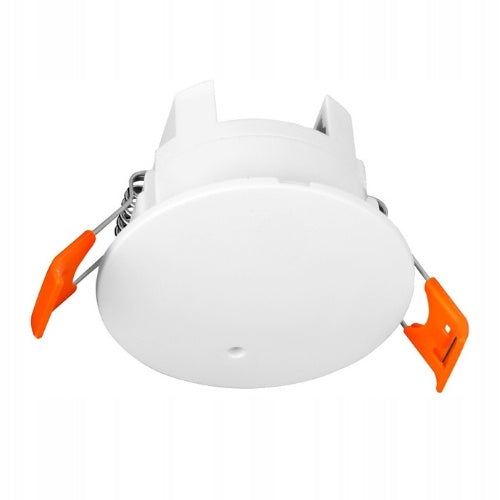
Prekė: Lubų judesio jutiklis ZigBee 24GHz, Tuya, 230V, baltas, Sone Smart. Kategorija: Jutikliai.
- Gamintojas: Sone
- Modelis: SB1701
The device connects to the application using ZigBee technology. For it to work, you need an additional device – a ZigBee gateway.
Sone Smart One intelligent presence sensor is an advanced sensor using 24 GHz radar technology that detects not only movement, but also the presence of a person – even when they remain stationary. This solution eliminates one of the most common problems with classic sensors, which is turning off the light while sitting or working at a desk.
The device is mounted in the ceiling (flush-mounted) and powered directly from the 230V mains, which ensures stable operation without the need to replace batteries. Thanks to quick push-in connectors, installation is simpler and safer than with traditional screw terminals.
The sensor works with the Tuya / Smart Life application, where you can set its sensitivity, detection range and presence maintenance time. On this basis you create automations , e.g. turning on the light only when someone is actually in the room.
Key Information
- ZigBee – Tuya / Smart Life gateway required (does not work without it)
- 24 GHz Radar – detects presence even without movement
- Doesn't turn off lights when sitting – works better than PIR
- Detects micro-movements – e.g., hand movement, breathing
- Adjustable range – up to approx. 6-7m + minimum zone
- Adjustable sensitivity – separate for motion and presence
- Presence hold time setting – full control over operation
- Distance and light (lux) measurement – more data for automations
- Event history in the app – motion, presence, light
- Scenes and automations – control devices in Tuya
- In-app notifications – motion/presence detection
- Ceiling mount – approx. 55mm hole (fits 60mm junction box)
- 230V power supply (L + N) – no batteries
- Quick connectors – easier installation than screw terminals
- Clean white appearance – no logos, just a small LED
- For indoor use – e.g., living room, office, bathroom
- Mounting up to 3m – optimal operating height
Dimensions and Installation
The sensor is designed for recessed ceiling installation. Installation requires a hole of approximately 55 mm in diameter, making it compatible with a standard 60mm junction box. The device is held in place by springs, allowing for quick installation without additional brackets.
The sensor's diameter is approximately 62 mm, and its height is 39 mm (about 49 mm including the springs on the mounting side). Its compact design means that once installed, the device is almost invisible and blends well with the ceiling.
Power is supplied directly from the 230V mains (L + N). The sensor features quick push-in connectors that significantly simplify installation and eliminate the need for traditional screw terminals.
Due to its ZigBee communication, a compatible ZigBee gateway (Tuya / Smart Life) is required for the device to function.
Connection diagram
Connect the phase (L) and neutral (N) cables to the appropriate terminals in the sensor. The device is powered by 230V.
How does 24 GHz radar differ from a regular motion sensor?
This model uses 24 GHz radar technology, which operates completely differently from classic PIR motion sensors. Instead of detecting temperature changes, it analyzes movement within a space – even very subtle movements.
In practice, this means the sensor detects not only movement but also the presence of a person. It can react to small movements, such as moving a hand or changing position, so the light doesn't turn off while you're still in the room.
This solution is particularly useful where traditional sensors fail – for example, in an office, bathroom, or living room when a user remains in one place for an extended period.
However, it's important to remember that higher sensitivity also requires proper parameter settings in the app to match the sensor's operation to the specific room.
Home screen and history in the app
The main screen gives a quick view of the sensor operation in real time. Thanks to this, you can immediately see whether the device is working properly and how it reacts to the presence in the room.
On the home screen you will find:
- Sensor status – information whether motion or presence has been detected
- Current distance – how far away is the detected person
- Light intensity (lux) – level of lighting in the room
- Maximum detection range – set limit of sensor operation
- Delay time – how long the sensor “sees” the presence when detected
- Sensitivities – separate settings for movement and presence
With this information, you can easily check whether the sensor is working properly and quickly adjust its settings to a specific room.
The application also includes a event history, which allows you to analyze the operation of the sensor over time:
- Motion and Presence Detection Register
- Information about absence
- History of changes in light intensity (lux chart)
This is useful for configuring automation and eliminating erroneous detections.
App Settings Description
You can easily understand and adjust the sensor's most important parameters for your room:
- Far Detection – sets the maximum detection range; the sensor will not react beyond this distance
- Close Detection – sets the minimum distance; the sensor ignores motion below this value
- Delay Time – determines how long after the last detection the sensor considers there is no presence
- Distance – shows in real-time how far away the detected person is
- Sensitivity – controls motion detection; the higher the value, the more easily the sensor reacts
- Presence Sensitivity – controls detection of presence without motion; the higher the value, the more easily a person is detected even when not moving
Sensor Settings in the App
In the Tuya / Smart Life app, you can precisely tailor the sensor's operation to your room. The settings are simple and clear, and most parameters can be changed with a single click.
Available settings:
- Quick Settings – pre-configured settings for rooms like living room, bedroom, or bathroom
- Maximum Range (Far Detection) – set how far the sensor should detect motion (e.g., up to 5-6m)
- Minimum Distance (Close Detection) – option to exclude a very close zone
- Hold Time (Delay Time) – specify how long after the last detection the sensor considers there is no presence
- Timer – create a device operating schedule
- Distance Display – option to view the real-time distance to the detected person
- Motion Sensitivity – adjust reaction to movement
- Presence Sensitivity – separate adjustment for detecting presence without motion
With these settings, you can reduce false detections and adapt the sensor to, for example, a small room or a large living room.
Automation and Scenes
The Sone sensor works based on the automations you create in the Tuya / Smart Life app. It does not control devices directly – instead, it sends information about the presence or movement on the basis of which the application performs selected actions.
You can set conditions like “if – then”. For example,: if the sensor detects presence, turn on the light, and if it does not detect anyone for a certain period of time – turn it off. Everything works automatically, without the need for a switch.
You can choose from different types of events, such as presence detection, absence or movement. You can also use additional data, e.g. light level (lux) so that automation works only when it is really needed – e.g. turned on the light only after dark.
This allows the sensor to control lighting, outlets, or other devices in your home, just when you need it.
Adding a device to the app
Adding a sensor to your app is fast and requires no specialized knowledge. The whole process usually takes several dozen seconds.
How to do it:
- Connect the sensor to 230V power supply
- Put your device into pairing mode (hold the reset button for a few seconds)
- In the Tuya / Smart Life app, open your ZigBee gateway
- Select "add device"
- The sensor will be automatically detected and added
After adding, you can give the device your own name and assign it to the selected room.
Once the setup is complete, the sensor is ready to go and can be used in automation right away.
Technical specification
- Communication type: ZigBee ( Tuya ZigBee gateway / Smart Life required)
- Application: Tuya Smart / Smart Life
- Sensor type: 24 GHz microwave radar (presence sensor)
- Power supply: 230V AC (L + N)
- Assembly: ceiling, flush-mounted (springs)
- Mounting hole: approx. 55 mm
- Diameter of the device: approx. 62 mm
- Height: ok. 39 mm (approx. 49 mm with springs)
- Maximum detection range: up to approx. 6 to 7 m
- Attttitude detection range: approx. 1 to 3 m
- Range adjustment: yes (maximum and minimum distance)
- Sensitivity adjustment: yes (separately for movement and presence)
- Backup time (delay): adjustable
- Distance measurement: yes (in-app)
- Measurement of light intensity: tak (lux)
- Automations: yes (scenes in Tuya / Smart Life app)
- Notifications: yes (message center in the app)
- Event history: yes
- Color: white (without logo on front, LED)
- Application: for internal use
- Contents of the set: sensor, manual (English)
- NOTE: ZIGBEE GATE IS NOT PART OF THE SET
Application and ecosystem TUYA and SMART LIFE
The device works with Tuya Smart and Smart Life – one of the most popular applications for IoT devices (Internet of Things). Adding devices is simple: just hold down the button on your device and search for it in the app.
Why choose Tuya and Smart Life?
- Polish interface: The application works in Polish, which facilitates operation.
- Wide compatibility: Works with more than 310 000 devices from nearly 10 000 manufacturers.
- Versatility: Lighting, monitoring, air conditioning, heating and more - up to 30 categories of devices.
- Free and regularly updated: The application is free and constantly developed with new features.
- Availability: It can be downloaded to iOS and Android devices.
- Intuitive operation: Simple and easy to use interface.
Types of communication:
- WiFi: Works without additional gateways, only WiFi connection (2,4GHz) is required.
- ZigBee: Requires a ZigBee gateway, it relieves the WiFi router and provides a stable connection. Thanks to ZigBee communication, we extend the life of products powered by batteries. These devices can communicate with each other even in the absence of a WiFi connection.
Specifications
| Group | Name | Value |
|---|---|---|
| Parametry | Condition | new |
| Parametry | Invoice | With VAT invoice |
| Parametry | Series | Czujnik obecności Zigbee 24GHz |
| Parametry | Brand | Sone |
| Parametry | Power supply | mains |
| Parametry | Communication | ZigBee |
| Parametry | Additional features | operating below 0°C |
| Parametry | Product weight with unit packaging | 0.035 kg |
| Parametry | Manufacturer code | SB1701 |
| Parametry | EAN (GTIN) | 5902065395976 |
| Parametry | Packaging status | original |
| Parametry | Batteries included | no |
| Parametry | Sensor type | motion,other |
| Parametry | Certificates of conformity | CE,WEEE |