
Piegādes termiņš visā Lietuvā: 5-7 darba dienas.
Piegādes cena uz norādīto adresi: 3 eiro


Apraksts
Trumpai apie prekę
Prekė: Oro užuolaida su laikmačiu PILOT TIMER, 2000 W, energiją taupantis elektrinis šildytuvas. Kategorija: Oro užuolaidos.
- Gamintojas: Mission Air
- Modelis: Kurtyna Farelka Mission Air AERO White 2000W
- Galia: 2000 W
✅ Two degrees of heating power: 1000 W and 2000 W
✅ Three airflow modes: cold (without heating), warm 1000 W, hot 2000 W
✅ Ceramic PTC Heating Element
✅ 10 – 49 °C thermostat with automatic power degree selection
✅ Decorative front panel with LED display
✅ Weekly programmer
✅ Timer 24 h
✅ Open window function
✅ SWING oscillation
✅ LED Display
✅ Child lock (LOCK) and overheating protection
✅ Protection rating IP23 · remote control included
✅ “Quick Start” button under the main switch
- Manufacturer: Mission Air®
- Model: AERO 2000W WHITE PTC
- Colour: white (white)
- Maximum power: 2000W
- Power adjustment: yes (1000W / 2000W)
- Type of heater: ceramic PTC
- Power supply: 220-240V 50-60Hz
- Dimensions: 54 x 18,7 x 12,3cm (width/height/depth)
- Length of the cable: approx. 1,5m
- Net weight: 2,95kg
- Temperature control: 10-49℃
- Degree of protection: IP23
- Controls: remote control
- Parental lock: YES
- Remote control: YES
- WiFi support: NOT
- Overheating protection: YES
- SWING oscillation function: YES
- Mounting hardware: included
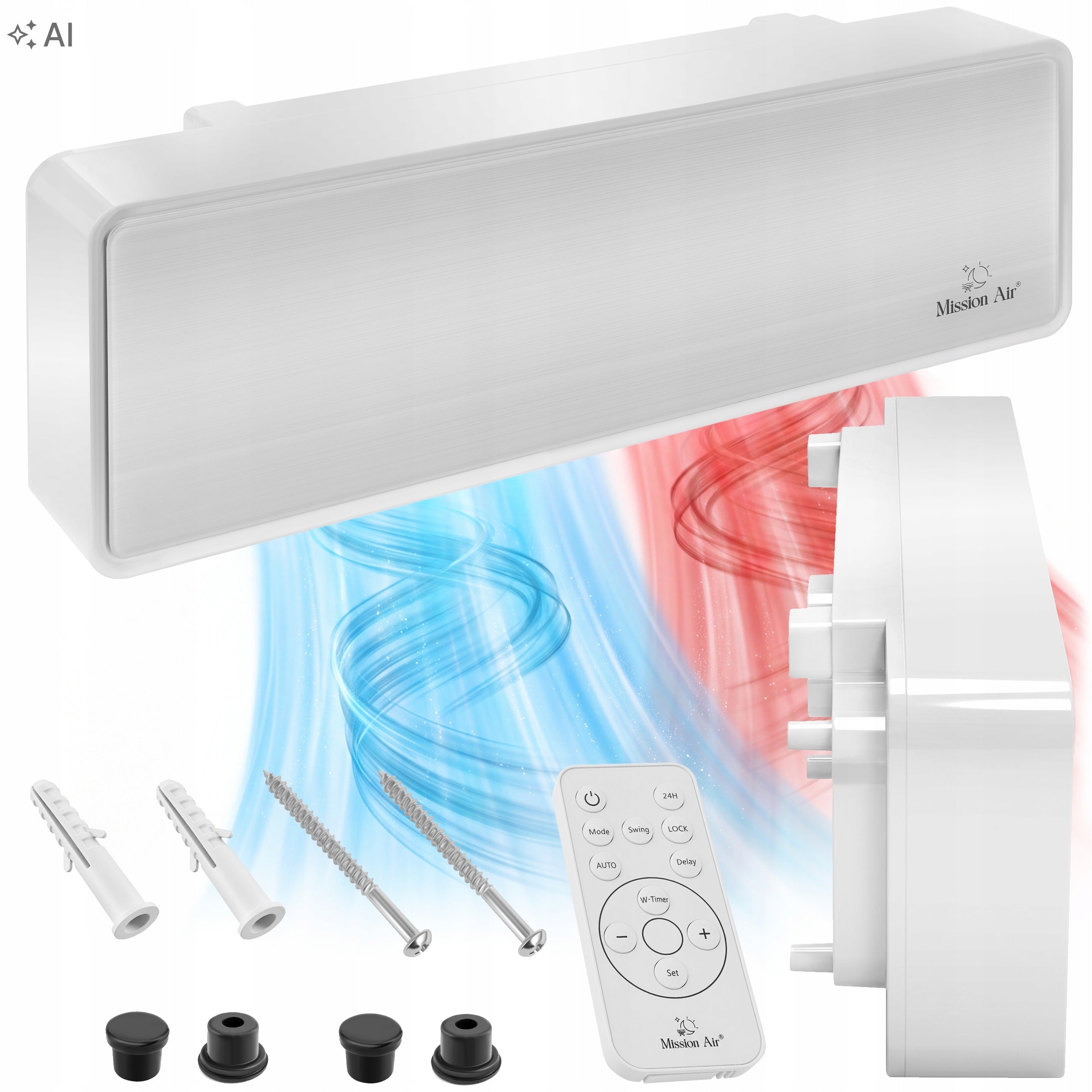
1 Air curtain AERO 2000 W
2 Original product packaging
3 Set of mounting elements
4 Multifunctional remote control
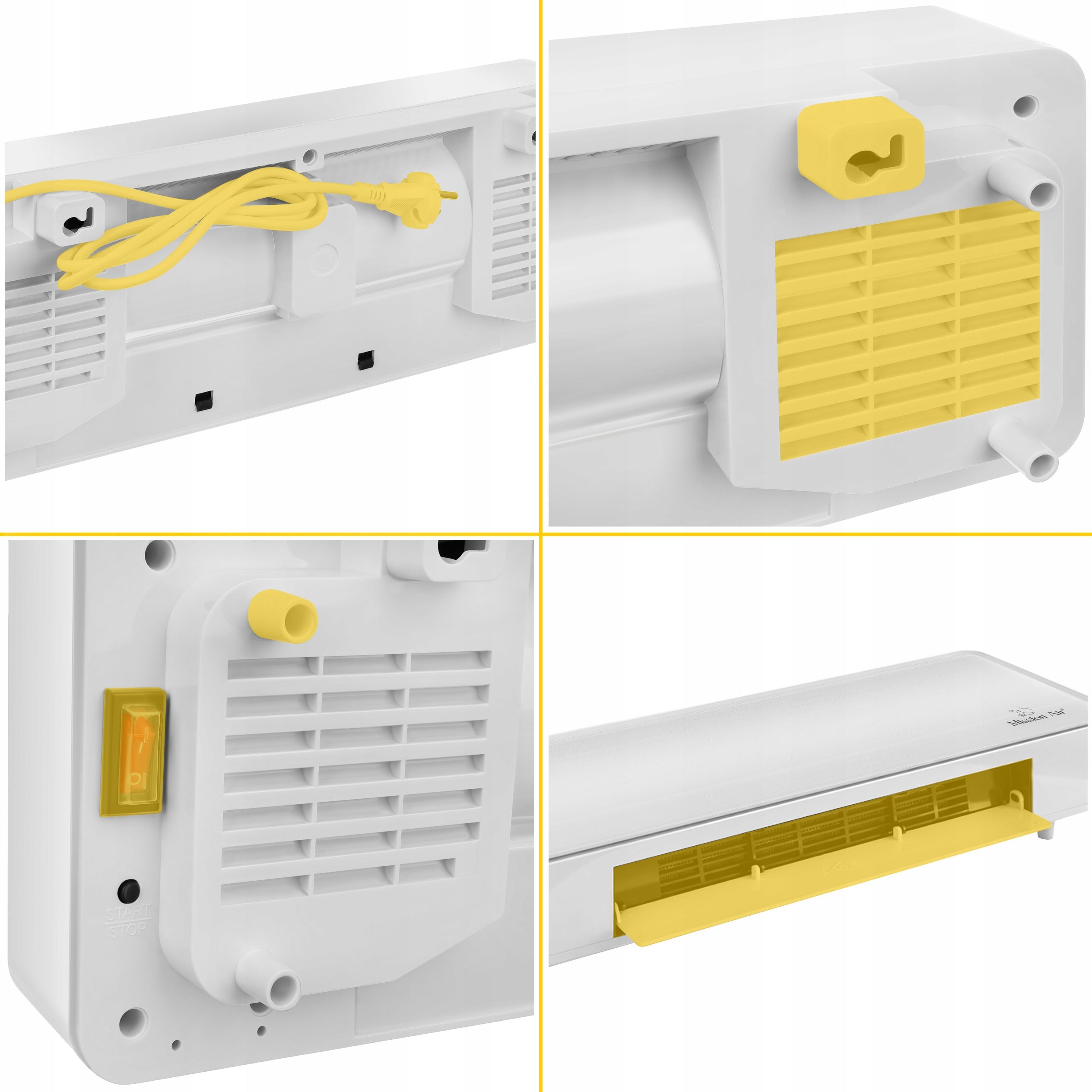
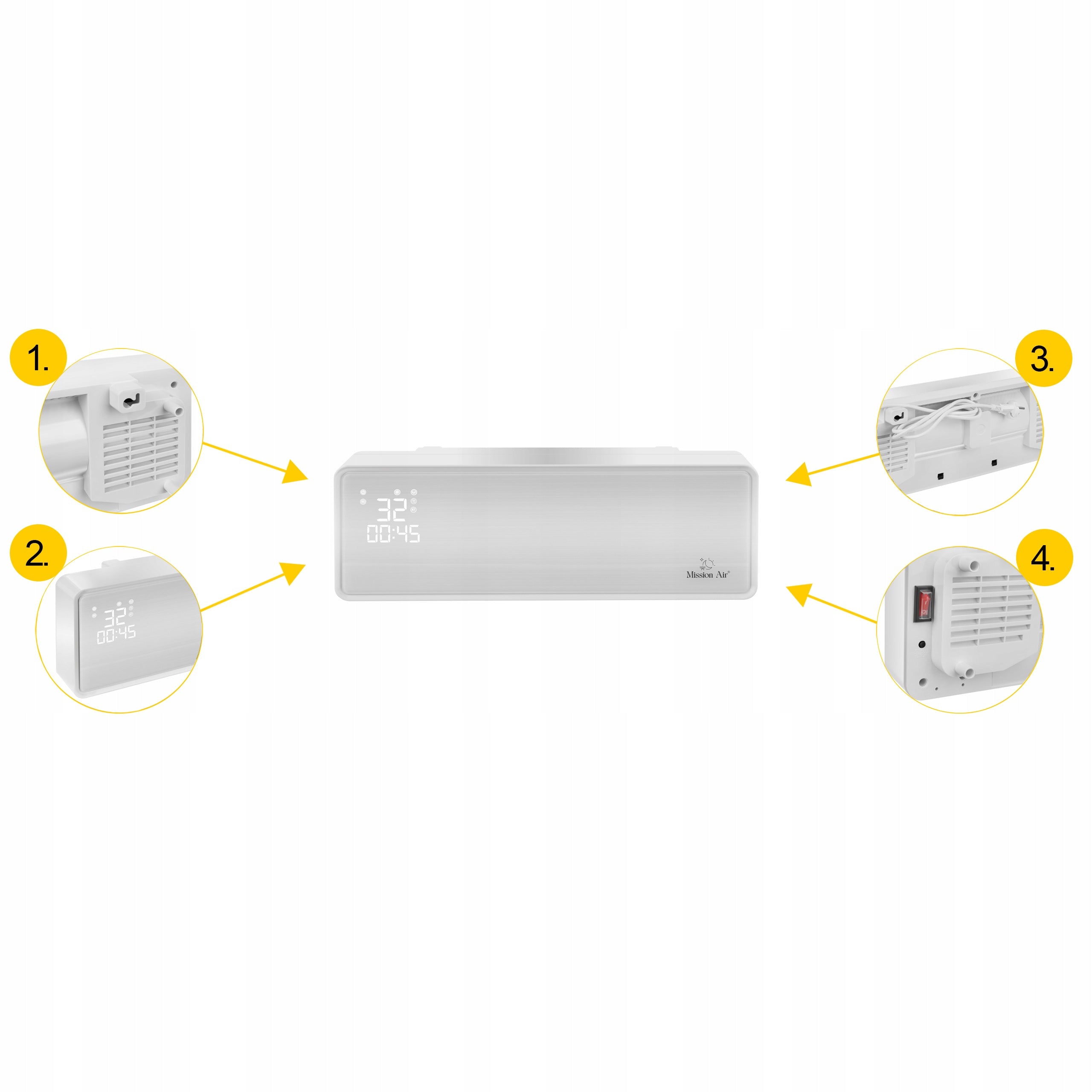
1 Mounting holes for wall hanging
2 Easy-to-read LED display
3 Power cord with plug
4 Main switch and quick start button
✔ AirBarrier™ 2000W - effective heat barrier at the door with power up to 2000W.
Two power levels: 1000 W and 2000 W. The “Quick Start” button under the main switch activates the 2000 W hot blowing without entering the menu, and the display indicates the active power level with a separate control.
✔ CeramicPTC™ - energy-saving PTC heater ensures a quick start of heating.
Operation in two degrees: 50 % power = 1000 W, 100 % power = 2000 W. After turning off the device, the fan still works 30 s and blows cool air, cooling the heating element.
✔ TriFlow™ 10-49°C - three airflow modes with temperature control from 10 to 49°C.
The MODE button passes sequentially: cold supply → warm (1000 W) → hot (2000 W) → back cold. You set the set temperature with the “+” and “−” buttons.
✔ DoorSense™ - open window detection stops working when the temperature drops sharply.
When switched on with the AUTO button, the device goes into energy-saving mode and records the ambient temperature on an ongoing basis. When it drops by 3 °C or more within 1 minute, the curtain stops working; restart with the ON/OFF button. Regardless of this function, the thermostat selects the power itself: a drop of 2 °C below the setting → 1000 W, a drop of 4 °C → 2000 W, an increase of 1 °C above the setting → cold air supply.
✔ SwingFlow™ - airflow oscillation distributes warm air throughout the room.
The SWING button turns on the automatic change of the vertical blowing angle - the stream moves up/down without setting the handlebars manually. The status of the function is indicated by a separate icon on the display.
✔ GlassPanel™ LED - glass front with invisible display when the device is turned off.
The display shows both room temperature (RT) and set temperature (ST), day of the week from Mo to Su, programmed on and off hours and active functions: power degree, SWING and open window mode.
✔ ChildLock™ - panel lock prevents accidental change of curtain settings.
You turn on the lock with the LOCK button on the remote control. Children between the ages of 3 and 8 may only turn on and off a properly installed device under adult supervision; children under 3 years of age should be kept away from the device.
🍽 Restaurant
The tables at the entrance are chosen last. The barrier limits the influx of cold, and the schedule starts the device before the first booking.
👗 Boutique owner
The interior design is part of the brand. The decorative panel above the frame looks like a finishing element, not technical equipment.
🏢 Office reception manager
The reception desk is located right at the door. The SWING oscillation moves the air flow vertically, and the display shows the actual and set temperature.
💆 Cosmetic salon owner
Treatments require a stable temperature, and the waiting room is directly adjacent to the entrance. ChildLock™ protects the settings from accidental change.
🛒 Food Store Manager
The door opens dozens of times per hour. The thermostat automatically raises power when the temperature difference increases.
💊 Pharmacist running a pharmacy
Storage conditions for preparations require a predictable temperature. The weekly schedule helps keep it open during opening hours.
🏡 Single-family home owner
The vestibule cools down every time you open the door. The device hangs above the entrance and does not take up space in a narrow room.
🔑 Service premises manager
The property is rented to various tenants. Installation of a minimum of 2 m above the floor and panel lock reduce the risk of accidentally changing settings.
✔ The entrance zone ceases to be the coldest place of the premises - you can finally develop it.
✔ The device above the door looks like an element of interior finishing, not like technical equipment glued to the wall.
✔ You can see on the display how much there really is and how much you wanted to have - without guessing if the device is still heating.
✔ You do not have to remember to turn it on and off - the schedule guides the device throughout the week.
✔ You do not heat an empty premises after hours or space behind a door that is open for longer.
✔ The device is useful all year round - outside the heating season it works as a barrier without heating.
✔ You recover the wall and the floor: nothing stands in the aisle, nothing to hit or bypass.
✔ Personnel and guests will not upset the settings with a random touch, and the device itself reacts to overheating.
❓ What if the vents are covered?
💪 Overheating protection will turn off the device automatically. Just disconnect them from the power supply, wait about 30 seconds until it cools down, remove the object blocking the holes and turn it back on - the curtain should return to normal operation. The air outlet must not be covered.
❓ What if the room is humid?
💪 The device has a degree of protection IP23 and hangs at least 2 m above the floor, outside the splash zone. Standard rules apply: a socket with grounding, a ban on placing the curtain directly under the socket and a ban on touching the device with a wet hand.
❓What if the door is opened frequently?
💪 That’s the scenario. The thermostat reacts incrementally: 2 °C below the setting → 1000 W, 4 °C below → 2000 W. Important caveat from the instructions: doors or windows should not remain open continuously - this affects the heating efficiency.
❓ What if someone upsets the settings?
💪 The LOCK button turns on the panel lock, so accidentally touching it will not change the settings. The programmed weekly schedule continues to work, and the device maintains time until the power is disconnected.
❓ What if nothing happens after turning on for a while?
💪 For the first 30 seconds after turning on, the curtain remains in standby mode. If during this time the heating function is not activated, the device will turn off itself - this is the behavior provided by the manufacturer, not a fault.
❓ At what height and spacing is the curtain installed?
✅Minimum 2 m above the floor, in an upright position, not closer than 0,25 m from the corner. Two mounting holes are spaced every 328 mm in a horizontal plane, and the screw heads should protrude at 10 mm – the device hangs on them. Before drilling, check that there are no electrical wires or pipes running in the wall.
❓ Are the batteries for the remote control included?
✅No. The remote requires two AAA 1,5 V batteries, which must be purchased separately. If you do not use the remote control for a long time, put insulation protection in it – the batteries will last longer.
❓What does the display show?
✅At the same time room temperature (RT) and set temperature (ST), day of the week from Mo to Su, power indicator light, active power stage (1000 W or 2000 W), SWING function icon, “Open window” function icon and programmed on and off time indicators.
❓ Does the curtain work without heating?
✅Yes. The first mode is cold air supply – the heating element remains off and the device creates the air barrier itself. This mode turns on by default when you press ON/OFF on the remote.
❓How to set the temperature and what happens then?
✅With the “+” and “−” buttons, select a value between 10 and 49 °C. When the room temperature drops by 2 °C below the setting, the device turns on heating 1000 W; when falling by 4 °C — 2000 W. After exceeding the setting by 1 °C, the curtain goes to cold air supply.
❓ Can I program work only during opening hours?
✅Yes. With the W.TIMER button, you set the day of the week, the time and minute of switching on, and the time and minute of switching off – separately for each day. With the DELAY button, you assign a temperature between 10 and 49 °C each day. A timer of 24 hours is used for ad hoc operation; setting “00” means no automatic shutdown.
❓ What is the AUTO button used for?
✅Enables the open window function – the window symbol lights up on the display. The device goes into energy-saving mode and monitors the ambient temperature. If within 1 minute it falls by 3 °C or more, the curtain interrupts the work. You restart it with the ON/OFF button, and turn off the function with the next press of AUTO.
❓What socket is needed and who should install the curtain?
✅The socket must have a ground wire and a load capacity of 250 V~10 A or higher, and the curtain must not be placed directly under it. The installation should be done by an authorized electrician or other qualified person.
❓Why is the fan still running when turned off?
✅This is a planned cooling enclosure. When you press the switch, the fan runs for another 30 seconds and blows cool air to cool the heating element. Only then can the plug be removed.
❓How to clean the device?
✅Disconnect them from the power supply first. Use a soft, damp cloth and neutral detergent, taking care of the heating elements. Check that the hot air outlet and inlet are free of dust and dirt. To get to the rear filter, press the top of the plastic grille on the back of the unit.
🍽 Restaurant with street entrance
The tables at the door are avoided by guests. The barrier limits the influx of cold air, and the front panel above the frame does not spoil the decor of the room.
👗 Butik and showroom
The decor is part of the offer, so the technical device above the entrance must look good. The LED display remains legible and its indications are visible from the floor level.
🏢 Reception and entrance area of the office building
The door works all day and the reception desk is right next door. The SWING oscillation moves the air flow vertically instead of directing a constant blow into one point.
💆 Treatment room or beauty salon
Stable temperature is important for comfort during the procedure. The thermostat maintains the selected setting, and the LOCK lock protects the settings from accidental change.
🕒 Shopping post with fixed opening hours
The weekly schedule starts the device before opening and turns it off after closing, with the possibility of setting a separate program for the weekend.
❄ Summer season in premises with air conditioning
Heating is unnecessary, but separating zones still matters. Cold airflow mode maintains the air barrier without starting the heating element.
❌MIT 1:The air curtain is simply a radiator hung above the door.
✅FACT: The principle of operation is different: the air stream separates two zones of different temperature. Therefore, the curtain also works with the heating element turned off, in cold air mode.
❌MIT 2: For it to work, it must be turned on at all times.
✅FACT: The weekly programmer and 24 hour timer limit the work to selected hours, and the open window function stops the device when the ambient temperature drops suddenly by ≥3 °C per minute.
❌MIT 3: Ceramic heating element and spiral are in practice the same thing.
✅FACT: AERO operates on a PTC ceramic element in two power levels – 1000 W and 2000 W – switched by a thermostat. There is no exposed heating spiral.
❌MIT 4: Curtain is only useful in winter.
✅FACT: The first of the three modes is cold air supply, without heating. The air barrier over the entrance also makes sense when the temperature difference works the other way around.
❌MIT 5: The higher the temperature I set, the faster it will heat up.
✅FACT: The setting determines the threshold at which the thermostat switches power, not the rate of heating. The overstated setting only extends the operation to 100% of the power – the device still has a maximum of 2000 W.
1 Power supply
Check that the voltage in the system corresponds to the data from the nameplate. Set the main power button to the off position “−” and connect the cable to the AC 220-240 V socket. You will hear a beep, the “Power” light will light up.
2 Remote control and clock
Remove the battery protection in the remote control. Press LOCK - the indicator light will light up on the panel, the display will show 00:00 and the symbol "Mo". Set the hour, minutes and day of the week using “+” and “−”. The numbers flash only 5 seconds - start setting right away.
3 Operating mode
Press ON/OFF - the device starts in cold air mode. The MODE button switches to warm (1000 W), the second press to hot (2000 W), the third returns to cold. Abbreviation: the "Quick Start" button under the main switch immediately starts the hot blowing 2000 W.
4 Temperature and blowing
With the “+” and “−” buttons, set the temperature in the range of 10-49 °C. Turn on the oscillation with the SWING button. If there are children in the environment or the device stands in a public place - turn on the LOCK lock.
5 Schedule
For ad hoc operation, use the 24H button (setting 00-24 h; “00” = no automatic shutdown). To the constant rhythm of the week: W.TIMER sets turn on and off times for each day, and DELAY assigns a temperature to each day. The AUTO button turns on the open window function.
By choosing Mission Air products, you get the Mission Air SHIELD package. This is an additional after-sales care, thanks to which you can be sure of peaceful and comfortable use of the purchased device.
Specifications
| Group | Name | Value |
|---|---|---|
| Parametry | Condition | new |
| Parametry | Invoice | With VAT invoice |
| Parametry | Brand | Mission Air |
| Parametry | Kind | with electric heater |
| Parametry | Power | 2000 W |
| Parametry | Product height | 19 cm |
| Parametry | Product width | 54 cm |
| Parametry | Product depth | 13 cm |
| Parametry | Maximum mounting height | 3 m |
| Parametry | Additional information | remote control included |
| Parametry | Product weight with unit packaging | 3.5 kg |
| Parametry | Manufacturer code | Kurtyna Farelka Mission Air AERO White 2000W |
| Parametry | Packaging status | original |