
Piegādes termiņš visā Lietuvā: 5-7 darba dienas.
Piegādes cena uz norādīto adresi: 3 eiro


Apraksts
Trumpai apie prekę
Prekė: Rekuperatoriaus valdiklis Zehnder ComfoAir Basic. Kategorija: Dalys.
- Gamintojas: IB
- Modelis: IB-TRON 3100FAN 230V 5906268594686
ATTENTION! PLEASE ONLY SUGGEST A DESCRIPTION IN THE CONTENT OF THE OFFER!
Due to the fact that in the process of productivization Allegro incorrectly combines offers with products, taking into account only a few parameters, please SUGGEST ONLY THE DESCRIPTION IN THE CONTENT OF THE OFFER and not the title of the product, which may be incorrect.
Unfortunately, we have no influence on this and despite providing the correct parameters, Allegro incorrectly combines offers with products.
General news
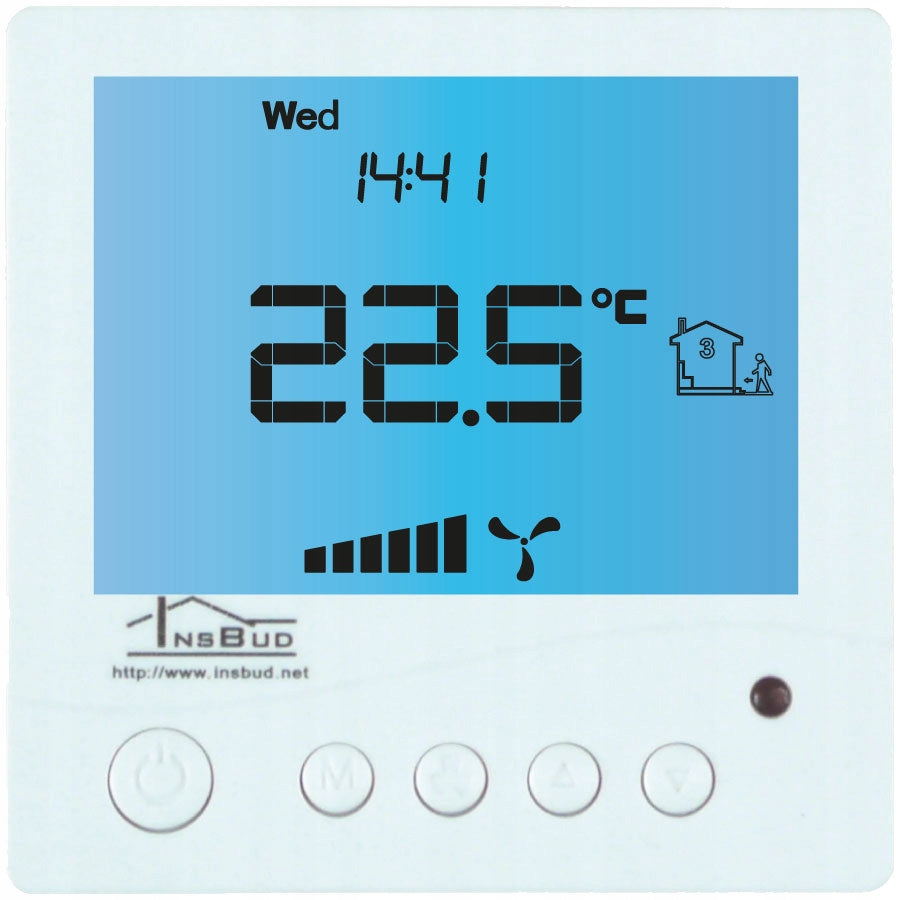
Controller IB–Tron 3100FAN-230V is an independent microprocessor controller equipped with a large liquid crystal LCD display, dedicated to operate air handling units. The controller allows you to control 3-speed control panels, for which the signal of switching on individual gears is short-circuiting the appropriate lines to lead out the common (for example, the mass of the system, neutral wire, etc.).
The IB–Tron 3100FAN-230V controller allows you to adjust the air exchange in the building based on a programmed work schedule or in manual mode.
The IB–Tron 3100FAN-230V controllers save energy costs by adjusting ventilation efficiency according to your needs. They thus contribute to environmental protection and financial savings. They can be widely used in hotels, offices, supermarkets, factories, hospitals, residential homes and other buildings.
• does not contain impurities and residues from the fermentation process
- Large backlit liquid crystal LCD display, displaying the current fan speed, temperature, settings, day of the week and other information.3 fan speed for your choice.
- Input for connecting the signal of the dirty filter of the ventilation unit. When this input is shorted to the neutral wire, the fan will be switched off as a priority and an audible signal will sound.
- Possibility to determine the passage of time, after which the control panel will switch to a mode reminding about the replacement of the filter (FILTER inscription, sound signal).
- Aesthetic and modern look.
- Blue backlight of the screen (the backlight activates when you press any button and deactivates after some time of inactivity).
- Easy, intuitive operation and programming.
- Power supply from 230V mains with battery backup of settings memory.
- Comprehensive programming of the process in a weekly cycle with an accuracy of 1 minutes and the ability to program 4 time periods each day.
- Manual or automatic operation mode.
- Temperature displayed with a resolution of 0, 1°C.
- Support additional digital input (three operating modes to choose from).
Compatibility
The controller can be installed in place of manual rotation switches, e.g.:
- Power supply: 230 V AC
- Legrand SISTENA LIFE Ventilation control switch 4 positions (0-1-2-3) 20A 250V cat. no. 775958.
- Zehnder switch SA 1-3V ventilation 4 positions (0-1-2-3) 20A 250V cat. no. 775958.
The controller is compatible with the following recuperators, among others:
- Zehnder ComfoAir 300, 350, 450, 550 Basic
- Titent B3B, ZWC-B
- StorkAir
- NED AIR WTA HR 300, 400
- Aeris 350 Standard VV
- Mistral 300, 400, 250 ECONO
- Mistral Mini 250 (with AC 230V automatic)
- Vasco D300EII, D400II, D400EPII, D500II, D500EII, DX4 E, DX5 E, DX6 E, X350, X425, X500, D275EP III
- Harmann Requra 20, 30, 40, 50
- ITHO ECO4, HRU-3 BVH-004, Daalderop Aure Vent D250
- Mitsubishi LGH Lossnay
- Dospel Luna three-speed
- Orcon HRC EcoMax, MaxComfort 300, 400, 500
- CLIMA Xtract ECO Plus Flat
The controller can also be connected directly to the fans:
Single-phase fans with gear control "detachments". Such a fan can be known by the fact that PE, N and several wires for the control phase leave it, e.g. L1, L2, L3.
If the fan has only three PE, N and L cables, it means that the fan is not factory adapted to change rotations. In order to control such a fan, additional electrical components are needed to control such a fan, e.g. inverter or autotransformer. An example of connection with such a fan using an autotransformer can be found in the user manual. On other offers we have elements necessary to connect such a fan.
Three-phase fans - you need to design the appropriate connection depending on the fan used.
Technical data
- Power supply: 230 V AC
- Max. contact load:3A/240V ? 700 IN
- Gear signal: short circuit COM1
- Filter signal: short circuit with C 2
- Digital input: short circuit with C 2
- Housing: ABS
- Display: LCD (3,2”)
- Control: Electronic
- Degree of protection: IP30
- Settings memory: 36 months
- Dimensions(height × width × depth):
- Control panel: 86 × 86 × 15 mm
- Relay module: 62 × 45 × 27 mm
- Power Consumption: < 2 W
- Number of Gears: 3
- Temp. Storage: -5 ÷ 50°C
- Temp. displayed: -20 ÷ 140°C
--- Scope of delivery
- 1x Controller (main panel)
- 1x Relay Module
- 1x User Manual
Principle of operation
When operating in automatic mode (with a schedule), the controller at the beginning of each time interval turns on the control panel gear programmed for this section. You can program 4 time intervals per day and assign each of them one of the 3 available speed values.
In manual mode, the user himself sets the course of the control panel. The control panel works on this gear all the time until another gear is set or the controller is turned off.
All gear control outputs are disconnected from the common output when the controller is off.
Construction of the controller
The IB-Tron 3100FAN 230V controller consists of two parts: a main panel with LCD display and keyboard and a relay module, with a screw connector for connecting the air handling unit, an additional button, filter signal and power supply.
Both modules are connected to each other using a 7-wire cable, with a length of several centimeters.
memory capacity: 256 MB
Control panel of the controller
- 1 - Display
- 2 - M button
- 3 - P button
- 4 - Temperature sensor
- 5 - MOUNTAIN button
- 6 - DOWN button
- 7 - FAN/OK button
LCD display
- 1 - day of the week
- 2 - current run or information
- 3 - visible symbol means keyboard lock
- 4 - temperature or setting value
- 5 - visible symbol indicates active ventilation mode
- 6 - graphic representation of the current race
- 7 - visible symbol means manual mode
- 8 - hour
- 9 - working range
- 10 - visible symbol means active semi-automatic mode
- 11 - graphic representation of the current race. The animated fan rotates at different speeds or is not visible.
Installation
Separate the two parts of the main panel housing of the controller. To do this, slide the flat screwdriver into the two slots visible at the bottom of the panel and pry the plastic hooks.
After prying the hooks, carefully separate both halves of the main panel. To avoid damage to the housing, the separation should start from the bottom of the panel (from the side of the hooks).
After separating both parts, disconnect the ribbon wire connecting the main panel to the actuator module by pulling the plug out of the outlet in the front of the panel.
The driver wiring, supplied to the electrical installation box, must be connected to the appropriate controller terminals, according to the instructions. Connection should be made with the power off.
Carefully arrange the excess wires in the electrical installation box, avoiding stresses that can tear the wires out of the terminals.
Place the controller actuator module in the electrical installation box, and screw the back of the main panel housing with two screws.
Connect the ribbon cable to the outlet in front of the main panel.
Connect both parts of the controller, starting with hooks at the top of the device and ending with hooks at the bottom.
For flush-mounted installation, it is recommended to use a rectangular mounting can with dimensions of 80x80x50mm.
The box is available at a separate auction.
Relay module
- L - power supply phase 230 V AC.
- N - neutral cable 230 V AC.
- HI - output of the 3 gear. This output is shorted to the common output when the controller wants to turn on the 3 gear of the control panel.
- MED - gear output 2. This output is shorted to the common output when the controller wants to turn on the 2 gear of the control panel.
- LO - output of gear 1. This output is shorted to the common output when the controller wants to turn on the 1 gear of the control panel.
- COM1 - joint gear outlet.
- SI - input of the clogged filter signal. Short-circuiting this input to C 2 triggers an alarm.
- FAN - digital input. Short-circuiting this input to C 2 activates the input.
- C2 - AI and FAN common output.
The described short-circuit situation of HI, MED, LO to COM1 relays concerns a situation when the setting parameter CFG=4. A detailed description of other relay states for other CFG value settings is described later in the manual.
Digital FAN Input
The controller is equipped with an additional digital FAN input where we can connect e.g. carbon monoxide, carbon dioxide, gas or air quality sensor (must have a NO connector). The active signal for this input is the short circuit of the FAN output from the C2. Typically, a monostable button is connected to this input (so-called. “bell”), shorted at the time of pressing and returning to the open position after releasing the button (used, for example, at doorbells). Alternatively, one of the FAN input modes provides for the connection of a bistable circuit breaker (standard, on/off type), e.g. for lighting). depending on the selected function (description later in the manual), the controller changes the fan gear accordingly after shorting the digital input (pressing the button).
User manual:
Detailed instruction manual in Polish:
http://download.insbud.net/pl/manuals/noname/pl_ib-tron_3100fan-230v-noname.pdf
Specifications
| Group | Name | Value |
|---|---|---|
| Parametry | Condition | new |
| Parametry | Invoice | With VAT invoice |
| Parametry | Brand | IB |
| Parametry | Kind | other |
| Parametry | Product weight with unit packaging | 0.4 kg |
| Parametry | Manufacturer code | IB-TRON 3100FAN 230V 5906268594686 |