
Piegādes termiņš visā Lietuvā: 5-7 darba dienas.
Piegādes cena uz norādīto adresi: 3 eiro




Apraksts
Trumpai apie prekę
Prekė: Veidrodinis fotoaparatas Canon EOS R7, korpusas. Kategorija: Veidrodiniai fotoaparatai.
- Gamintojas: Canon
- Modelis: EOS R7
- Spalva: black
- Komplektacija: body
Canon EOS R7 body
Canon EOS R7 digital camera
Canon EOS R7 is a mirrorless camera with a Canon RF lens mount. It is particularly well -suited to sports and nature photography thanks to its APS-C sensor providing a greater range and a frame rate of up to 30 fps. /s in RAW format . It has a very fast and accurate Dual Pixel CMOS AF II autofocus mechanism that perfectly tracks objects in the frame. Canon EOS R7 records 4K/60p or 4K/30p (downsampling from 7K resolution) videos in 10-bit, 4:2:2 sampling . Built-in matrix stabilization with an efficiency of up to 7EV allows you to film and photograph "handheld" even in difficult conditions.
Sensor and imaging in the Canon R7 camera
Advantages of the APS-C matrix
The EOS R7 is perfect for situations where you want to get closer to a subject but can't get close to it. The camera features a Canon -developed and manufactured 32.5-megapixel APS-C (22.3 × 14.8 mm) sensor , which provides 1.6 times the range of the same focal length on a full-frame camera . The high resolution of the matrix allows for additional cropping of the image in post-production, providing even greater possibilities of zooming in on photographed subjects without any noticeable loss of image quality. This is a huge help when photographing wildlife and sports.
The EOS R7 camera allows you to take great photos even after dark . A maximum sensitivity of ISO 32000 (expandable to ISO 51200) allows you to use fast shutter speeds to capture motion even in low light .
File formats
JPEG files are a great choice when you need a small file size and don't want to spend time in post-production, but the EOS R7 offers another option: HEIF files, which have improved image quality compared to JPEGs at roughly the same size. They also feature 10-bit color , which improves the image's dynamic range and provides more accurate color reproduction .
If quality is very important to you, RAW format is also available. The EOS R7 supports a variety of options, including 14-bit CR3 RAW files , which are C-RAW files that take up less space with minimal loss of quality.
Dual Pixel RAW
Dual Pixel RAW technology is also available, allowing you to fine-tune images after they've been captured using our Digital Photo Professional software. Digital Photo Professional (DPP) software is available as a free download and provides a comprehensive solution for RAW image processing. You can browse and select images, make adjustments and changes, and then process the images into JPEG, HEIF, or TIFF files. DPP also lets you work with Dual Pixel RAW files, allowing you to micro-adjust parameters like bokeh, focus point, and ghosting after you've taken the shot. This is possible because each pixel on the EOS R7 camera's sensor is divided into two photodiodes, each of which receives a slightly different view of the world – just like the eyes of a photographer. This tiny difference, called parallax, allows the camera to focus very quickly and precisely. Typically, when an image is captured, the signals from both photodiodes are combined to create the final image. However, when the camera is set to Dual Pixel RAW mode, the signal from each photodiode is saved separately – as two images in the same RAW file.
When editing Dual Pixel RAW files in Canon DPP, you can improve the final result by adjusting selected parameters:
Image micro-adjustment
If the image is not sharp enough in a specific area, it can be adjusted to achieve key sharpness using the depth information stored in the Dual Pixel RAW image file.
Bokeh Offset
With Dual Pixel RAW files, you can adjust the position of out-of-focus areas or the bokeh effect to improve your composition, e.g. moving the out-of-focus object in the foreground that obscures the photographed subject.
Ghosting reduction
Light shining directly into the lens can cause internal reflections, which are called "ghosting." This effect can be controlled using Dual Pixel RAW technology.
Shutter and speed
Canon EOS R7 shoots continuously at a speed of 15 fps. /s using the mechanical shutter , and the silent electronic shutter allows you to record up to 30 fps. /s , even in RAW format. At the same time , AF with tracking and the auto exposure function are still working . A larger memory buffer allows you to capture up to 51 RAW files or 224 JPEG images in a single 15-frame burst. /sec. With pre-caching enabled, the camera captures images 0.5 seconds before you press the shutter button, meaning you'll capture every moment, even if it happens before you release the shutter. It's the perfect tool for wildlife and sports photography when you're waiting for the right moment.
The camera's electronic shutter has a shutter speed of 1/16,000 second , allowing photographers to freeze even the fastest movement, as well as use a large aperture in bright light to limit depth of field.
When using a mechanical shutter, flicker-free photography is also available – perfect for shooting indoor sports or indoor events. This feature is automatically activated when artificial light flicker is detected and allows each photo to be taken at the maximum brightness of the flickering light. The result is a consistent exposure for every shot.
Filming with the EOS R7
The Canon EOS R7 lets you switch between photos and videos with the touch of a button. It allows you to record 4K videos in many ways, with different recording speeds and different compression methods. Thanks to the easy-to-use menu, the camera can be easily configured to work according to your needs.
When recording in UHD 4K resolution using the full width of the APS-C sensor, frame rates of up to 60 fps are available. /s, and Full HD up to 120 fps. /sec . This allows for smooth movement reproduction and the creation of slow-motion effects.
For the highest image quality, use the EOS R7 4K Fine mode, which downsamples 7K data to produce a highly detailed 4K/30p image. This image looks great when played on 4K screens and can be downscaled to Full HD . There is also a special 4K UHD mode available, in which data is read from a section of the matrix, which provides a greater range of the lens .
For advanced independent filmmakers, the EOS R7 offers Canon Log 3 : a "flat" color profile that not only preserves detail in the highlights and shadows of a scene, but also simplifies color grading during editing, enabling professional-quality video productions . BT709, BT2020 and Cinema Gamut color spaces are also supported.
The EOS R7 also has microphone and headphone jacks for recording and monitoring audio , respectively, as well as an HDMI port for connecting external recorders and monitors.
For those serious about creating social media content , there's a vertical video feature – perfect for recording content for reels and visual stories. The EOS R7 also supports direct live streaming to YouTube and seamlessly connects to your smartphone , so you can put your content where you need it.
Autofocus on the Canon R7
The camera's Dual Pixel CMOS AF II system tracks subjects continuously, and its sensitivity allows for confident and accurate focusing in low-light conditions down to -5 EV (or -3.5 EV in movie mode) . Thanks to this sensitivity, autofocus is also available with very narrow maximum apertures – even f/22. This enables automatic focusing even when using ultra-telephoto lenses with teleconverters.
There are 651 focusing zones throughout the frame. They can be used to track fast-moving subjects, individually or in groups for more precise focusing. Flexible Zone AF on the EOS R7 allows you to adjust the size and position of the AF area to suit your needs. Below are the available autofocus settings:
1-point AF
Complete focus control with a single AF point. An excellent option for macro photography.
Spot AF
Focus on an even smaller area than with 1-point AF and get the best selective control.
Expand AF area (above, below, right or left)
A single AF point is selected, and the camera helps by using focus points above, below, and to the sides – useful when selectivity is needed but the subject is also moving.
Expand AF area (around)
Similar to the above option, but with more secondary focus points for even greater accuracy with moving subjects.
Flexible Zone AF
Allows you to group individual AF points into a zone that can be moved around the frame. The camera will select only AF points within this zone, tracking the subject moving within it. This is a good tactic when you need to focus on objects in a specific part of the frame.
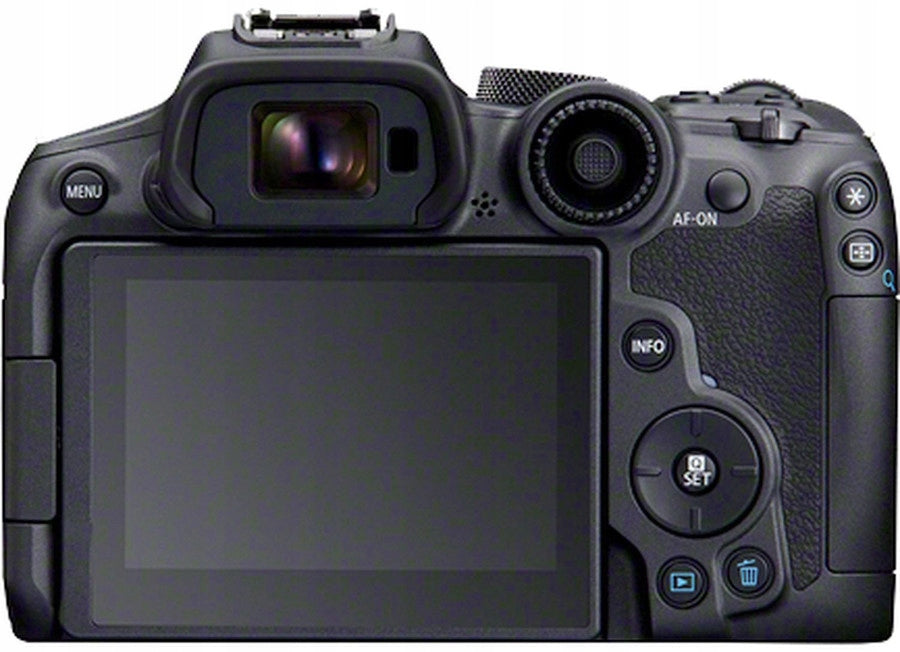
When the camera is held up to your eye, you can also touch and drag the active focus point using a touchscreen, such as a laptop trackpad. For those who prefer to adjust focus with a separate button, AF can be initiated using the AF-ON button on the back of the camera (instead of half-pressing the shutter button). The AF-ON button can also be used to start and stop tracking and change AF orientation modes.
Object tracking
The EOS R7 features deep learning AI technology (trained and programmed from thousands of real-world photos) and iTR AF technology, which are also available in the EOS R3, EOS R5 and EOS R6. This means it can recognize people, animals, and vehicles and keep them in focus no matter where they are in the frame. The initial (start) AF point or zone can be set to specify the starting point where the camera begins tracking.
When photographing people, the camera always focuses on the eyes if they are visible. If they are not (if wearing sunglasses, a helmet, or with your face turned away), the EOS R7's next priority is the head, followed by the body. In this way, people are constantly tracked, even if they turn away from the camera for a moment or their face is covered with a mask. Objects turned upside down and athletes wearing helmets are also recognized and in focus.
Photographing birds in flight is one of the greatest challenges for wildlife photographers. The EOS R7 identifies birds and can track them perfectly as they fly across the landscape, allowing you to capture every subtle movement. The camera algorithm also recognizes cats and dogs . The EOS R7 also tracks vehicles , including motorcycles and cars, which is important for motorsports photographers. The camera can even distinguish between closed and open-cockpit vehicles, focusing on the driver's helmet if it is visible.
The EOS R7 can be configured to prioritise specific subject types or set the speed at which it switches between different subjects as they appear in the frame – which can be useful when photographing a particular athlete, for example.
What is appropriate for one object may not be appropriate for another. That's why the EOS R7 features four AF mode settings – focus settings designed for different performance.
Case 1
General. Perfect for photographing most moving objects
Case 2
Ignores obstacles and tracks objects. It is useful when photographing sports events and wildlife, when subjects may be temporarily obscured by objects in the foreground.
Case 3
Reacts quickly. Suitable for when waiting for a subject to appear in the frame: for example, a mountain biker suddenly appearing in the frame.
Case 4
Suitable for objects that accelerate or decelerate quickly, such as motorcycles entering or exiting a curve.
Case A [AUTO]
The camera automatically selects the best of the above modes.
Focus sequence
When shooting from a close distance, the depth of field is shallow, so the EOS R7's autofocus system is perfect for macro photographers . Pressing the shutter button once starts a series of photos. The focus is automatically adjusted from the initial position to infinity.
The resulting series of photos can be combined into a single composite image using Digital Photo Professional software . As a result , we obtain an image with a large depth of field . Additionally, the EOS R7's Extended Depth of Field feature allows this process to be performed in-camera, while the Depth of Field Cropping feature allows photographers to determine where the focus drop-off occurs.
IBIS image stabilization
The built-in image stabilizer (IBIS) in the EOS R7 provides effective image stabilization regardless of the lens used. In-body mechanical image stabilization systems and in-lens optical image stabilization systems work together via the RF mount to provide up to 7 stops of camera shake protection with the RF-S 18-150mm F3.5-6.3 IS STM lens, and up to 8 stops with some RF lenses . This sensor-lens approach to image stabilization opens up new creative possibilities. You can shoot handheld with a shutter speed of a few seconds to blur moving objects while keeping everything else stationary in focus – an approach that would normally require a bulky tripod. Nature and sports photographers working with telephoto lenses can freely shoot handheld even in low light.
Additional stabilization features
The camera's IBIS tilt function also allows you to level the image, so you can achieve level horizons for picturesque scenes.
There's also a panorama mode, which uses built-in image stabilization to compensate for camera shake caused by panning left, right, up, or down. The result is high-quality panoramas with fewer inconsistencies caused by motion.
Operation and ergonomics of the Canon R7
Intuitive controls
Canon EOS R7 has many new solutions compared to previous EOS R system models . The AF point selection joystick is surrounded by an adjustment dial , thus combining two classic EOS system controls. You'll find it next to the viewfinder – where your thumb rests when holding the camera. This is ideal for fast, instinctive shooting.
The focus mode switch is located on the front of the camera and is easy to find when the camera is held to your eye . This makes it easier for photographers to switch between autofocus and manual focus, even with lenses that don't have their own focus switch. In the center of the switch there is a function button to which you can assign selected functions.
Many of the EOS R7's controls can be customized and programmed to suit your needs. The main menu system includes a My Menu screen where you can place your most frequently used commands. Three custom shooting modes allow you to instantly recall your favorite settings.
The swivel touchscreen allows you to compose and shoot from unusual angles and perspectives, and also enables comfortable and stable filming.
Electronic viewfinder
The EOS R7 has a convenient and fast 2.36 million-dot electronic viewfinder with 100% frame coverage. The image preview looks exactly as it did when you shot it – including exposure, white balance, picture style, and depth of field. Delays in the viewfinder display and the blackout effect have been eliminated. Thanks to the electronic viewfinder, you can not only frame but also review photos. Customizable viewfinders display relevant image information in the viewfinder, allowing you to shoot without taking your eyes off the viewfinder. EOS R7 users can also select Smooth Image mode (120 fps refresh rate). /s) or power saving mode (60 fps refresh rate). /s). With 1.15x magnification and a 22mm eye point that's offset from the camera body, the viewfinder is comfortable to use, even for extended periods.
Those switching from DSLRs will find a special mode on the EOS R7 that simulates the experience of using an optical viewfinder, displaying images with a very wide dynamic range and high tonal gradation . The new mirrorless camera system delivers a DSLR-like experience.
Canon EOS R7 camera body
With a durable magnesium alloy construction and multiple protective rubber seals , the EOS R7 is resistant to dust, dirt and water . This allows you to work in difficult conditions or when the weather gets worse. However, durability and quality do not make the EOS R7 camera heavy. It is lighter than the EOS 7D Mark II, making it an ideal solution for traveling photographers .
Dual memory card slot
Images can be saved on high-speed SD memory cards in the UHS-II standard – two such cards can be placed in the camera. Dual memory card slots enable reliable shooting and can be configured in a variety of ways:
Automatic backups
A great option for recording important events when you need protection against unforeseen events. A favorite tactic of travel photographers.
Overflow
When one card is full, the camera automatically saves photos to the other card so you don't have to interrupt shooting. Perfect for wedding, wildlife and sporting events when you don't want to miss a single shot.
JPEG on one card, RAW on the other
Thanks to this function, we can divide the photos we take into a set of "test photos" (JPEG) and separately saved RAW files that we will use for editing.
Videos on one card, photos on the other
This function makes work organization easier, and you can also use a larger card to record videos and a smaller one to save photos. The perfect solution for hybrid event recording or documentary projects.
Foot for connecting accessories
The EOS R7 features a new , advanced hot shoe that allows you to connect new devices and accessories quickly and easily . This includes a digital microphone and an XLR adapter for recording high-quality audio tracks. You can also connect selected Speedlite flash units and Speedlite Transmitter flash triggers to the camera this way to control your lighting.
USB connector
The EOS R7 also features a USB-C 3.2 port for quick, wired shooting with an Apple iPhone using the Lightning port or with a PC/Mac running Canon 's EOS Utility software.
Wireless and Communication
The EOS R7 supports a variety of connectivity options. It can connect to Wi-Fi networks, smart devices and PC/Mac computers. The camera can maintain an always-on Bluetooth Low Energy connection with your smartphone, making connecting to a Wi-Fi network quick and easy. You can browse files, download and edit images and videos, and post to social media – all from your mobile device. Thanks to connectivity, you can, for example, send reduced or full-size images and videos to your client using the Canon Camera Connect app.
The camera can also connect to Wi-Fi networks independently – without the need for a smartphone. This way, images can be sent to our image internet gateway. canon , where they are stored in the cloud, ready for editing and post-production. You can configure your camera to upload all content or only images you've marked as favorites.
Live streaming of recordings
The EOS R7 lets vloggers live stream directly to YouTube – without the need for a computer. Simply connect your camera directly to your Wi-Fi network for professional results. The EOS R7 provides a clean HDMI output, so it is suitable for live streaming via HDMI adapters . You can also use your PC/Mac with EOS Utility software to connect to popular video conferencing platforms.
Whether your EOS R7 is connected to a smart device or PC/Mac, you can control it remotely using the Canon Camera Connect app and explore new ways to shoot creatively. This allows you to place the camera in one place and operate it from another device, for example when taking selfies or group photos. This is also a great solution for wildlife photography: place the EOS R7 close to an area frequented by animals, and then shoot from a distance to avoid disturbing the subjects.
Business applications
For studio, macro and food photography in a controlled environment, you can control the EOS R7 from a desktop or laptop computer running EOS Utility, Canon 's SDK (Software Development Kit) or third-party apps. With the SDK, Canon EOS R7 camera can be programmed in virtually any way.
Cloud-based RAW image processing
Photographers can process RAW files from the EOS R7 camera not only on the device itself or on a PC/Mac, but also in the image cloud. canon , which allows for better image quality. RAW files uploaded to the cloud are created using a neural network image processing engine. This allows you to reduce digital noise, achieve a better demosaicing effect and reduce the number of artifacts.
• Sharp details are better reproduced by reducing jagged edges
• Moiré and false color reduction
• Noise reduction improves image quality at high ISO settings
• Optical correction of distortion, distortion and diffraction effects
Converted images are saved to the cloud as JPEG or HEIF files, which you can then download to your computer or smart device.
Easy transition from DSLRs
Canon EF and EF-S lenses are compatible with the EOS R7 via a lens adapter (three models are available). AF, AE, IS and most other lens technologies work the same way.
The EOS R7 also uses the same batteries (LP-E6) as many DSLR cameras, including those in the EOS 7D and EOS 70D series, EOS 80D and EOS 90D, making it easy to interchange batteries.
Specifications
| Group | Name | Value |
|---|---|---|
| Parametry | Condition | new |
| Parametry | Invoice | With a VAT invoice |
| Parametry | Brand | Canon |
| Parametry | Model | EOS R7 |
| Parametry | Resolution | 32.5 Mpx |
| Parametry | Included | body |
| Parametry | Screen diagonal | 2.95" |
| Parametry | Sensor type | CMOS |
| Parametry | Mounting | Canon RF |
| Parametry | Sensor size | APS-C |
| Parametry | Color | black |
| Parametry | Continuous shooting | 15 kl./s |
| Parametry | Viewfinder | electronic |
| Parametry | Video quality | 4K |
| Parametry | Flash | clippable |
| Parametry | Power supply | rechargeable battery |
| Parametry | Image processor | DIGIC X |
| Parametry | Autofocus | Tak |
| Parametry | Product width | 13.2 cm |
| Parametry | Product height | 9.04 cm |
| Parametry | Product depth | 9.17 cm |
| Parametry | Product weight | 130 g |
| Parametry | Product weight with unit packaging | 0.53 kg |
| Parametry | EAN (GTIN) | 4549292185447 |
| Parametry | Manufacturer code | 5137C003 |
| Parametry | Batteries included | yes |
| Parametry | Stabilization | sensor-shift stabilization,lens optical |
| Parametry | Supported memory cards | SD,SDHC,SDXC |
| Parametry | Communications | Bluetooth,Wi-Fi |
| Parametry | Ports | audio 3,5 mm,microHDMI,USB typ C |
| Parametry | Design | touch screen,flip screen |
| Parametry | Functions | auto ISO,panorama mode,histogram |