
Pristatymo terminas visoje Lietuvoje: 5-7 d.d.
Pristatymo kaina nurodytu adresu: Pristatymas nemokamas


Aprašymas
Trumpai apie prekę
Prekė: Belaidis CarPlay ir Android Auto adapteris, Bluetooth, WiFi 6. Kategorija: Siųstuvai.
- Gamintojas: MBIT
- Modelis: MB-14
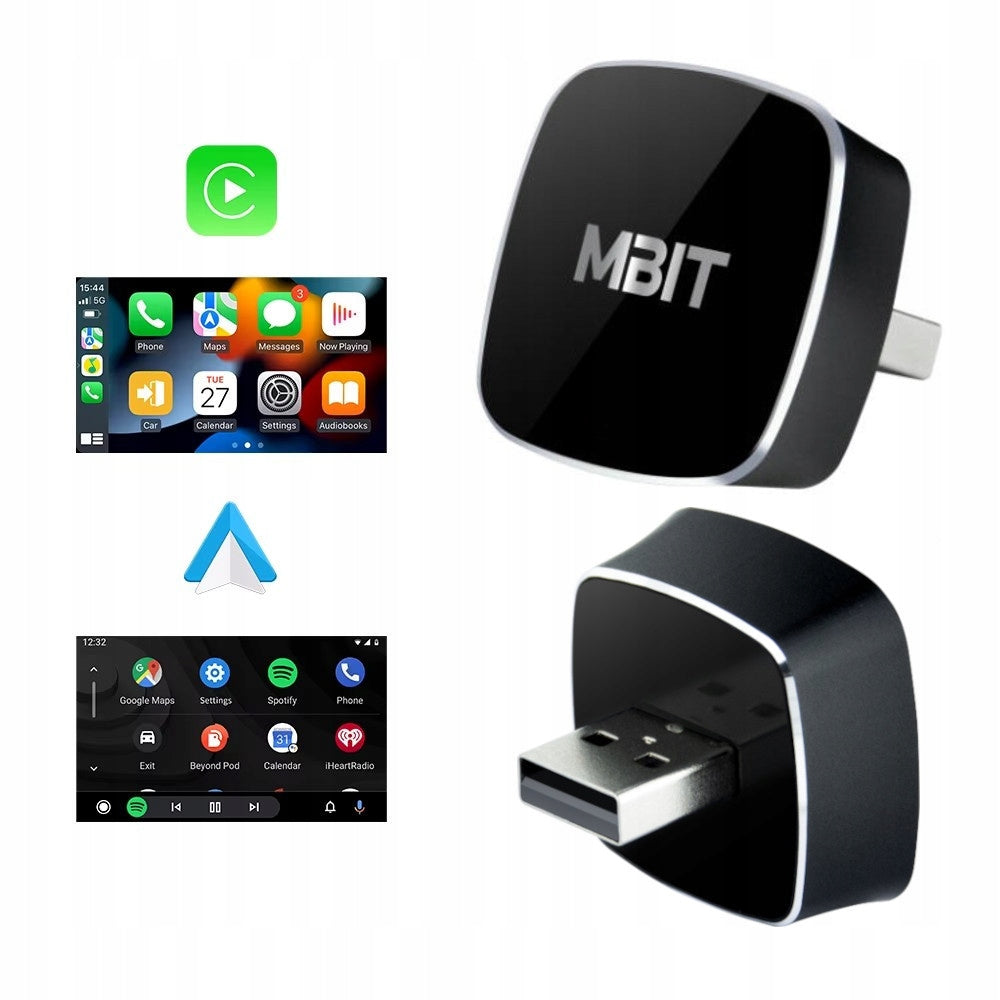
Supports wired connection to wireless CarPlay and Android Auto.
The latest version of WiFi 6 is a technology that guarantees high transmission efficiency, allows you to have much higher bandwidth than in the case of WI-FI 5 or earlier networks offered by other adapters. The use of this technology minimizes the risk of connection loss and delays in audio and video transmission.
Already have a factory or additional CarPlay / Android Auto system in your car, but you get tired of connecting the cable every time?
This adapter will solve your problem! Simply plug it into the USB port in your car once, and then your phone will connect automatically.
✅ Full support CarPlay and Android Auto
✅ No more cables – fast, stable connection
✅ Automatic connection after starting the car
✅ Compatibility with most models of cars and radios that support CarPlay/Android Auto
Attention! Adapter, like most devices of this type, does not add CarPlay / Android Auto functionality in the car, which does not have this system. Only allows wireless connection instead of wired in cars with CarPlay/Android Auto.
✅ Specification:
- Device type: CarPlay / Android Auto wireless adapter
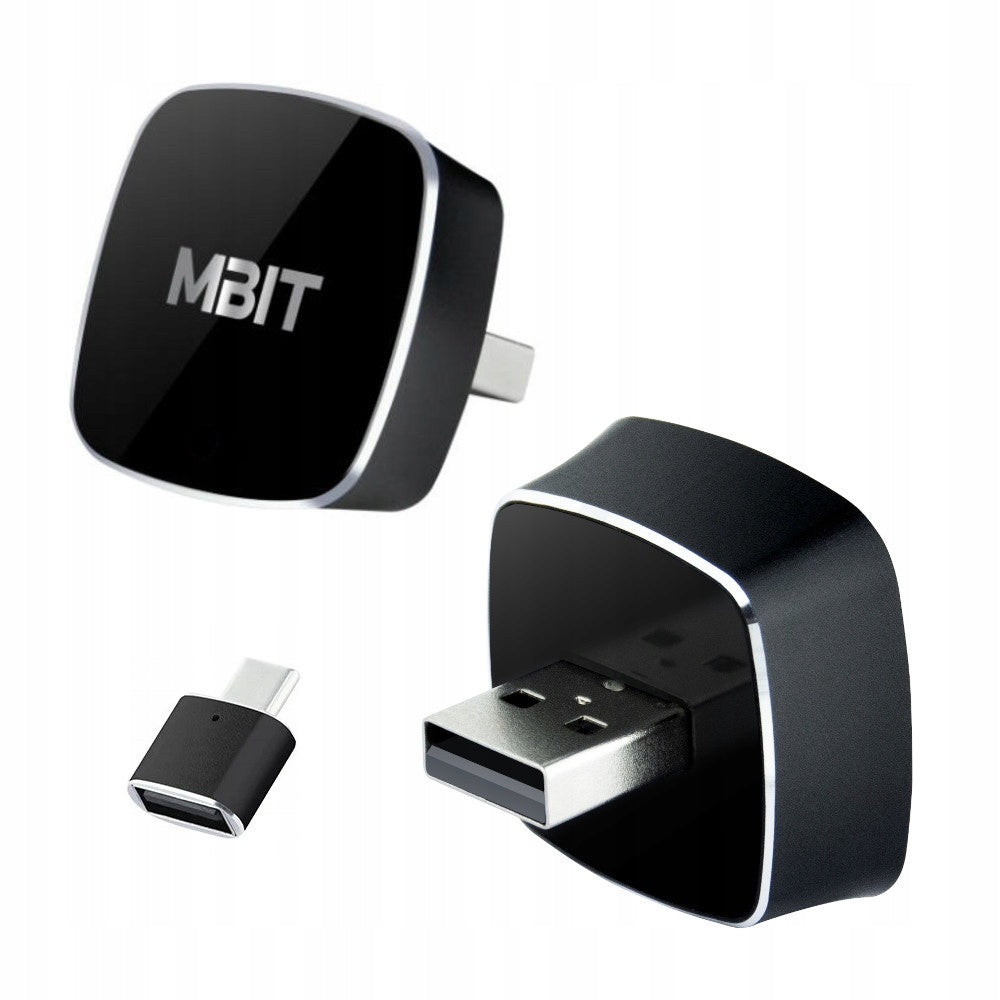
- Connection: USB-A (USB-C adapter included)
- Connectivity: Module WiFi 6 + Bluetooth 5.2
- Pairing time: approx. 20-50 seconds on first setup
- Pairing time after first connection: 10 seconds
- Power supply: from the USB port of the car
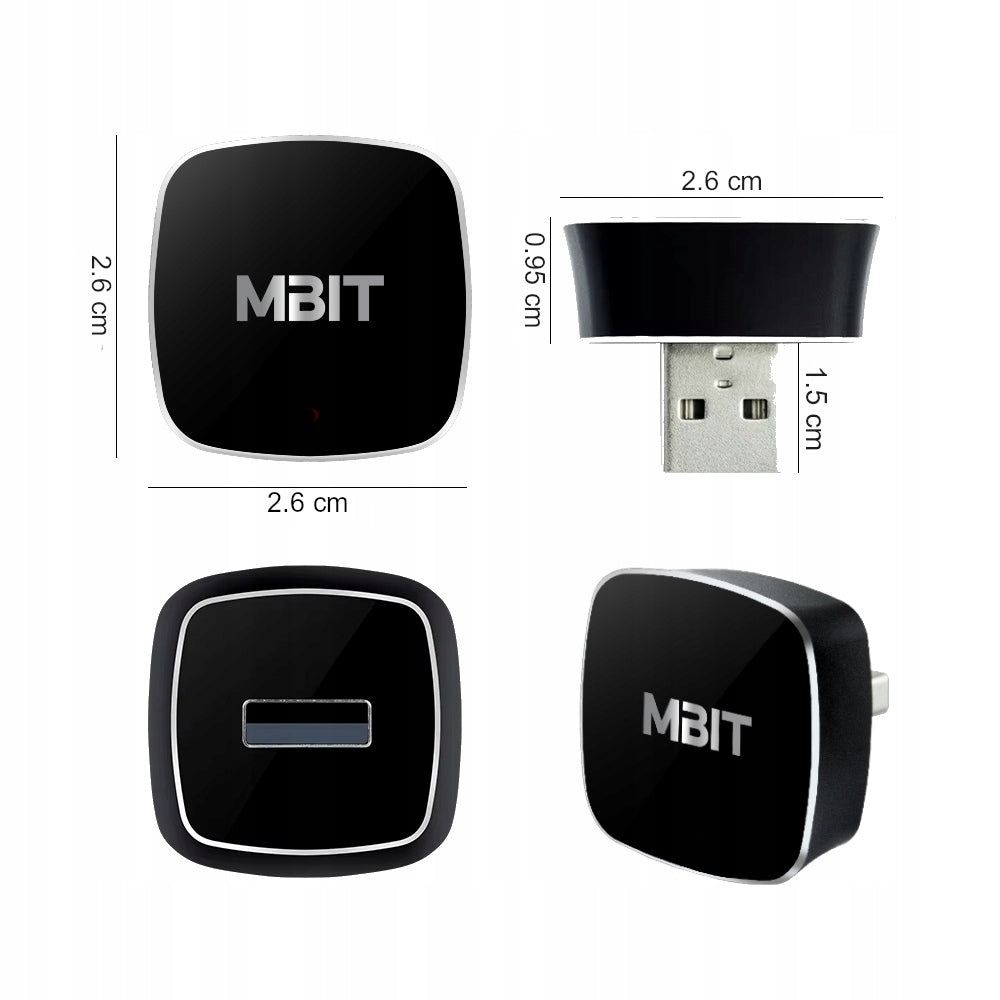
- Dimensions: 26 x 9,5 x 26 mm - one of the smallest adapters available on the market
- Robust PREMIUM housing made of aluminum and acrylic
- Compatibility: iPhone 6 and later (iOS 12.1+), Android 11.0+, cars with factory wired CarPlay/Android Auto
- Supports voice functions
- LED backlight
- The latest version of WiFi 6 is a technology that guarantees high transmission efficiency, allows you to have much higher bandwidth than in the case of WI-FI 5 or earlier networks offered by other adapters. The use of this technology minimizes the risk of connection loss and delays in audio and video transmission.
- Very compact design, fits perfectly into the USB port, does not stick out, minimal probability of breaking the device!!!
⭐ The adapter was tested before it was put on sale – we use our devices privately to catch common everyday problems and refine the operation before active sales.
⭐ We provide after-sales support in Poland – assistance in configuration, pairing, updates and typical utility problems.
⭐ All user requests are verified and forwarded to the technical team to resolve the issue and develop the device (important for changes in iOS/Android).
A modern solution that allows you to convert a wired connection to the multimedia system in the car to wireless, eliminating the need for cables. Simply connect the adapter to a USB A or USB C port on a CarPlay or Android Auto-enabled radio, and then pair your phone via Bluetooth. After a short setup, the system works as if the phone is connected by a cable – providing access to navigation, music, voice assistant and messages without having to pull the phone out of your pocket. Thanks to this, driving becomes safer and more comfortable, and the interior of the car is free from unnecessary cables.
*Adapter does not add features and apps to CarPlay/Android Auto. It only serves to replace the wired connection, and the icons used are for illustrative purposes only.
✅ The adapter works with a wide range of cars equipped with factory wired CarPlay or Android Auto. It is compatible with both iPhones (iOS 12.1+) and smartphones running Android 11.0+ or later.
✅ If your car supports CarPlay or Android Auto via cable, you can now use these systems wirelessly, without having to replace equipment or interfere with your car’s electronics.
*NOTE! Adapter may be incompatible with some BMW cars.
✅ Wi-Fi 6 and Bluetooth 5.2 technologies in the adapter provide smooth image on the car screen, clear sound and practically no delay when using the application. The device works in a simple plug & play mode, so when connected to a USB port and one-time configuration, subsequent CarPlay or Android Auto launches proceed quickly and without additional actions.
The latest version of WiFi 6 is a technology that guarantees high transmission efficiency, allows you to have much higher bandwidth than in the case of WI-FI 5 or earlier networks offered by other adapters. The use of this technology minimizes the risk of connection loss and delays in audio and video transmission.
✅ Enjoy full access to Google Maps, Apple Maps, Spotify, YouTube Music and other apps without worrying about connection quality.
✔ Online navigation – support for Google Maps, Waze, Apple Maps
✔ Music and podcasts – Spotify, Tidal, YouTube Music, Apple Music
✔ Hands-free calling – integration with car microphone and speakerphone
✔ Voice Assistant – Siri and Google Assistant available at any time
✔ Apps – WhatsApp, Messenger, SMS, audiobooks and more
*The device allows you to use these functions only if you have CarPlay or Android Auto in your car
*Adapter does not add features and apps to CarPlay/Android Auto. It only serves to replace the wired connection, and the icons used are for illustrative purposes only.
- CarPlay / Android Auto Adapter (Wireless)
- User manual
- Aesthetic packaging
- The set includes an adapter that allows you to connect the device to a USB-C port!!!
Very compact design, fits perfectly into the USB port, does not stick out, minimal probability of breaking the device!
We present a list of some car models that are equipped with Apple CarPlay / Android Auto:
MBIT is supported by about 98% of multimedia units in cars where CarPlay / Android Auto is supported by a cable.
- Abarth 2017-
- Acura 2017-
- Alfa Romeo 2018-
- Audi 2017-
- Bentley 2017-
- Borgward 2017-
- Buick 2017
- Cadillac 2016-
- Chevrolet 2016-
- Chrysler 2017-
- Citroen 2016-
- Dodge 2017-
- Ferrari 2016-
- Fiat 2017-
- Ford 2017-
- Genesis 2017-
- GMC 2016-
- Honda 2016-
- Honda Bikes 2018-
- Hyundai 2015-
- Jaguar 2017-
- Jeep 2017-
- Kia 2015-
- Lincoln 2017-
- Lexus 2019-
- Land Rover 2017-
- Mercedes-Benz 2016-
- Maserati 2017-
- Mazda 2018-
- MG 2016-
- Nissan 2017-
- Opel 2016-
- Peugeot 2017-
- Porsche 2017-
- FRAMEWORK 2018-
- Renault 2017-
- Seat 2016-
- Skoda 2016-
- Subaru 2017-
- Suzuki 2016-
- Toyota 2016-
- Vauxhall 2016-
- Volkswagen 2015-
- Volvo 2016-
(If your brand is not on the short list: it matters if your car has a wired CarPlay/Android Auto. )
✅ Compatible phones – Android Auto (Android 11+) and Apple CarPlay
🔥 Apple CarPlay (iPhone)
Apple iPhone 5, iPhone 5s, iPhone 6, iPhone 6s, iPhone 7, iPhone 8, iPhone X, iPhone XR, iPhone XS, iPhone 11, iPhone 12, iPhone 13, iPhone 14, iPhone 15, iPhone 16, iPhone 17, iPhone SE (1st gen), iPhone SE (2nd gen), iPhone SE (3rd gen.)
🔥 Android Auto wirelessly (recommended: Android 11+ and 5 GHz Wi-Fi)
Samsung (Galaxy): Samsung Galaxy S21, Samsung Galaxy S21+,Samsung Galaxy S21 Ultra; Samsung Galaxy S22, Samsung Galaxy S22+,Samsung Galaxy S22 UltraSamsung Galaxy S23, Samsung Galaxy S23+, Samsung Galaxy S23 Ultra,Samsung Galaxy S23 FE; Samsung Galaxy S24, Samsung Galaxy S24+,Samsung Galaxy S24 UltraSamsung Galaxy S25, Samsung Galaxy S25+, Samsung Galaxy S25 Ultra; Samsung Galaxy Z Fold3,Samsung Galaxy Z Fold4, Samsung Galaxy Z Fold5, Samsung Galaxy Z Fold6;Samsung Galaxy Z Flip3, Samsung Galaxy Z Flip4, Samsung Galaxy Z Flip5,Samsung Galaxy Z Flip6; Samsung Galaxy A52, Samsung Galaxy A52s,Samsung Galaxy A53, Samsung Galaxy A54, Samsung Galaxy A55,Samsung Galaxy A34, Samsung Galaxy A35
Google (Pixel): Google Pixel 3, Google Pixel 3a, Google Pixel 4, Google Pixel 4a, Google Pixel 5, Google Pixel 5a, Google Pixel 6, Google Pixel 6a, Google Pixel 7, Google Pixel 7a, Google Pixel 8, Google Pixel 8a, Google Pixel 9
Xiaomi: Xiaomi Mi 11, Xiaomi 11T, Xiaomi 11T Pro; Xiaomi 12, Xiaomi 12 Pro; Xiaomi 12T, Xiaomi 12T Pro; Xiaomi 13, Xiaomi 13 Pro; Xiaomi 13T, Xiaomi 13T Pro; Xiaomi 14, Xiaomi 14 Ultra; Xiaomi 14T, Xiaomi 14T
Redmi: Redmi Note 10, Redmi Note 10 Pro; Redmi Note 11, Redmi Note 11 Pro; Redmi Note 12, Redmi Note 12 Pro; Redmi Note 13, Redmi Note 13 Pro; Redmi Note 14, Redmi Note 14 Pro
POCO: POCO F3, POCO F4, POCO F5, POCO F6; POCO X4 Pro, POCO X5 Pro, POCO X6 Pro
Motorola: Motorola edge 20, Motorola edge 30, Motorola edge 40, Motorola edge 50; moto g52, moto g72, moto g73, moto g84
OnePlus: OnePlus 9, OnePlus 9 Pro; OnePlus 10 Pro, OnePlus 10T; OnePlus 11; OnePlus 12, OnePlus 12R; OnePlus Nord 2, OnePlus Nord 2T, OnePlus Nord 3
OPPO: OPPO Find X3 Pro; OPPO Find X5, OPPO Find X5 Pro; OPPO Find X6, OPPO Find X6 Pro; OPPO Reno 6, OPPO Reno 7, OPPO Reno 8, OPPO Reno 9, OPPO Reno 10
realme: realme GT, realme GT 2, realme GT 3; realme 9, realme 10, realme 11, realme 12
Sony: Sony Xperia 1 III, Sony Xperia 1 IV, Sony Xperia 1 V; Sony Xperia 5 III, Sony Xperia 5 IV, Sony Xperia 5 V; Sony Xperia 10 III, Sony Xperia 10 IV, Sony Xperia 10 V
Nothing: Nothing Phone (1), Nothing Phone (2)
Nokia: Nokia X20, Nokia X30; Nokia G50, Nokia G60; Nokia XR20, Nokia XR21
⚠ Important: Android Auto does not work on Android (Go edition). Phones without Google services may not support Android Auto. Liquidity depends on the phone (performance, load, temperature, system version).
⚠ Restrictions and safety
✅ only works on cars with factory wired CarPlay or Android Auto
✅ it’s not an “Android box” – it doesn’t add Netflix apps as separate apps in the car
✅ watching videos while driving is system-blocked in CarPlay/Android Auto for safety reasons (this is not an adapter defect)
✅ in the long run it is recommended to charge the phone
ℹ Information about trademarks
All listed names, logos and trademarks, such as Apple CarPlay, Android Auto, iPhone, iOS, Bluetooth and others, are the property of their respective owners. They were used for informational purposes only, in the context of compatibility of the device with specific technologies and systems.
⚠ Although our high-quality adapter supports most multimedia units of cars equipped with CarPlay/Android Auto system, this does not always ensure 100% compatibility in the above. cars. The stable operation of the adapter is influenced by many factors often independent of the adapter, e.g.: the model of the multimedia station in a specific car, other devices or signals nearby interfering with the WiFi or Bluetooth signal, the model and version of the phone software, external applications such as Yanosik, incorrect configuration and even the software version of the multimedia station in the car.
*Adapter may be incompatible with some BMW and Tesla vehicles.
⚠ Remember that the adapter, like most devices of this type, does not add CarPlay / Android Auto functionality in the car, which does not have this system. It only allows wireless connection instead of wired in cars with CarPlay/Android Auto.
⚠ The adapter is a communication bridge, but the main work is done by a smartphone. Therefore, speed and fluidity depend on the phone (performance, system version, background applications, power saving mode).
INSTRUCTIONS FOR INSTALLING THE ADAPTER:
NOTE!!! Adapter is used to replace cable connection!!! Android Auto or CarPlay cable support is required for proper operation in your car.
Before use, we recommend installing possible operating system updates on your phone.
- Place the adapter in a USB slot that supports CarPlay or Android Auto in your car.
- Turn on Bluetooth and WiFi on your phone.
- Tap on the Carplay/AndroidAuto icon in your car.
- If previously the phone was connected to the car system "by cable", it is worth removing the old pairing with the car unit in the Bluetooth settings.
- Turn on the search in the Bluetooth section of your phone, then connect to the "carplay_box_XXXX" adapter.
- Enjoy Android Auto/CarPlay without cables!
ONLY BLUETOOTH PAIRING IS REQUIRED TO CONNECT CARPLAY/ANDROID AUTO! WiFi connection will occur automatically.
Operating instructions available as an attachment in the listing!
To access additional device options, you need to connect to the WIFI network of the device.
From the access to the device settings, you can, for example:
- device reset
- update
In case of problems with operation, it is worth checking the above settings, or reset the device to factory settings.
❓FAQ - Frequently asked questions and answers
❓ How do I know if the adapter will be compatible with my car?
The most reliable test: if your phone runs CarPlay/Android Auto wired when connected with a cable to a USB port – the adapter will work as wireless.
❓ What exactly do I pair on the first startup?
Pair your phone with the "carplay_box_XXXX" adapter via Bluetooth. After that, the adapter sets the correct wireless connection automatically.
❓ Why does it sometimes help to “forget” the old pairing with the car?
If the phone was previously connected directly to the car unit (BT/CarPlay), the system may try to return to the old path. Removing the old pairing and re-pairing with the adapter organizes the setup.
❓ Does the adapter “add” CarPlay/Android Auto to a car that doesn’t have it?
No. This is not an Android box. The adapter only does the wireless version with the wired version.
❓ Why can’t you watch video while driving?
This is a CarPlay/Android Auto system restriction (security). This is not a defect of the device.
❓ What does liquidity and possible delays depend on?
From connectivity conditions and above all from the phone: performance, system version, energy saving, background applications. In case of problems, it helps to update the phone system and turn off aggressive energy saving.
*The MBIT trademark is owned by MOTOMED and is registered with the Patent Office Registry. Use of the mark without the consent of the owner strictly prohibited.
Specifications
| Group | Name | Value |
|---|---|---|
| Parametry | Condition | new |
| Parametry | Invoice | With VAT invoice |
| Parametry | Brand | MBIT |
| Parametry | Product weight with unit packaging | 0.1 kg |
| Parametry | EAN (GTIN) | 5908454393165 |
| Parametry | Model | MB-14 |
| Parametry | Manufacturer code | MB-14 |
| Parametry | Functions | hands-free set |
| Parametry | Power supply | USB 5V |
| Parametry | Packaging status | original |
| Parametry | Certificates of conformity | CE |
| Parametry | Signal source | Bluetooth,USB |